About Bank Statement Converters
What is Bank Statement Converters?
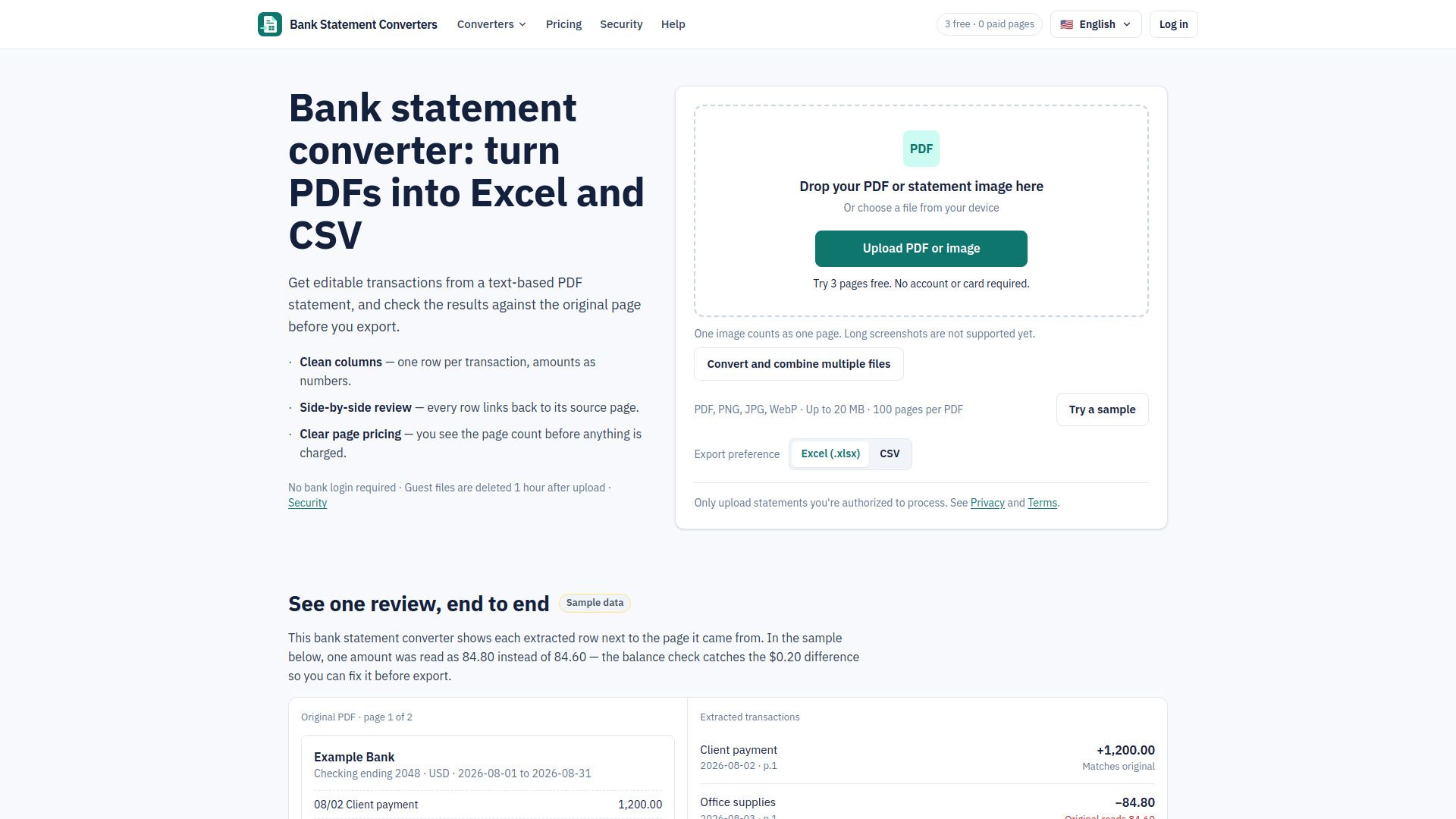
Bank Statement Converters is a specialized tool designed to transform PDF bank statements into editable Excel and CSV formats, making it easier for independent bookkeepers, small business owners, and freelancers to manage their financial data. The service allows users to review transactions against the original PDF before exporting, ensuring accuracy and reliability in the conversion process. With a focus on user privacy, the tool does not require bank login information and automatically deletes files after processing.
This converter is built on a foundation of rigorous testing, as it only supports bank statement formats that have been verified for accuracy. Each supported format is listed with its verification date, providing users with confidence in the tool's capabilities. By prioritizing clean transaction rows and ease of use, Bank Statement Converters aims to streamline the financial management process for its users.
Bank Statement Converters Features
Bank Statement Converters is a specialized tool designed to transform PDF bank statements into easily manageable Excel and CSV formats, catering primarily to independent bookkeepers, small business owners, and freelancers. This functionality allows users to review transactions side-by-side with the original statements, ensuring accuracy and transparency before exporting the data. The service operates without requiring bank login credentials, and it prioritizes user security by automatically deleting files after processing.
The converter supports batch uploads, enabling users to convert multiple PDFs or images into a single spreadsheet, which streamlines the workflow for those handling numerous statements. It is built on a foundation of rigorous testing, with only verified bank statement formats being supported, ensuring reliability and effectiveness. Users are encouraged to provide feedback on desired features, particularly those from paying customers and bookkeepers, as this input helps shape the tool's development and enhancements.
- PDF to Excel conversion
- PDF to CSV conversion
- Batch bank statement conversion
- Side-by-side transaction review
- No bank login required
- Automatic file deletion
Why Bank Statement Converters?
Using Bank Statement Converters offers significant advantages for independent bookkeepers, small business owners, and freelancers who often face the challenge of converting PDF bank statements into usable transaction formats. The tool is designed not just for conversion but for accuracy, ensuring that every extracted transaction maintains a direct link to its source page. This meticulous approach allows users to verify amounts down to the cent and check balances, providing a clear view of discrepancies that may arise during the conversion process.
Moreover, the focus on a review step in the workflow enhances the reliability of the output, as users can make informed decisions about any necessary adjustments. By prioritizing transparency and accuracy, Bank Statement Converters eliminates the frustration of dealing with incomplete or erroneous data. This commitment to quality means that users can confidently rely on the tool for their accounting needs, knowing that it is built specifically for their requirements and continuously improved based on user feedback.
How to Use Bank Statement Converters
To get started with Bank Statement Converters, simply upload your PDF bank statements or images directly onto the platform. The tool allows for batch conversion, meaning you can convert multiple files into a single spreadsheet, streamlining your workflow. Once your files are uploaded, the converter will extract the transactions and present them in a format that you can easily review against the original documents.
After the conversion, you will have the option to export your data in either Excel (.xlsx) or CSV format, depending on your needs. This flexibility is particularly useful for bookkeepers and small business owners who require clean transaction rows for accounting imports. Additionally, the review process ensures that you can verify the accuracy of the extracted data before finalizing your export, giving you confidence in the integrity of your financial records.
Ready to see what Bank Statement Converters can do for you?and experience the benefits firsthand.
Key Features
How to Use
Visit the Website
Navigate to the tool's official website.
Pros & Cons
What's good
What's not good
Pricing
- 6,000 pages / year
- Full annual allowance upfront
- Excel & CSV export
- Review and edit alongside the PDF
- Balance and duplicate checks
- 12,000 pages / year
- Full annual allowance upfront
- Excel & CSV export
- Review and edit alongside the PDF
- Balance and duplicate checks
- 24,000 pages / year
- Full annual allowance upfront
- Excel & CSV export
- Review and edit alongside the PDF
- Balance and duplicate checks
- 60,000 pages / year
- Full annual allowance upfront
- Excel & CSV export
- Review and edit alongside the PDF
- Balance and duplicate checks
Bank Statement Converters Traffic Analysis
Frequently Asked Questions
Alternatives to Bank Statement Converters

Airtable Assistant
Airtable Assistant is a powerful AI-driven tool designed to serve as a personal app builder, data analyst, and web researcher. It enables users to effortlessly extract valuable insights from extensive datasets, answering complex business questions with ease. With its ability to analyze thousands of records, Airtable Assistant helps organizations identify customer pain points and streamline decision-making processes, enhancing overall productivity and efficiency.
PDNob Image Translator
PDNob Image Translator is a powerful tool designed to provide accurate translations of images with an impressive 99% AI OCR accuracy. It processes over 10 million images each month, ensuring fast and reliable performance without network delays, making it an ideal choice for users seeking efficiency and precision in their translation needs.
PDNob PDF Editor
PDNob PDF Editor is a versatile and affordable tool designed for efficient PDF editing, annotation, and organization. With its user-friendly interface and lightweight system requirements, it provides powerful features that rival those of Adobe Acrobat without the associated complexity or cost. Additionally, all editing is performed locally on the user's device, ensuring data privacy and security.
Online Audio Converter
Online Audio Converter is a free, user-friendly web application that allows users to convert audio files across more than 300 formats, including popular options like MP3, WAV, and FLAC. With features such as batch conversion and customizable audio settings, it ensures quick processing and secure handling of files, automatically deleting them from servers shortly after use. This tool is perfect for anyone looking to easily convert or extract audio from video files without the need for software in
PDFgear
PDFgear is a free, AI-powered PDF editor that allows users to effortlessly manage their PDF documents across various devices. With features like seamless editing, conversion between multiple formats, and built-in AI for summarizing content, PDFgear enhances productivity while ensuring a user-friendly experience. Its offline capabilities and comprehensive toolkit make it an ideal choice for both personal and professional use.
TopPDF
TopPDF is a versatile online platform designed to streamline PDF management, offering a comprehensive suite of tools for tasks such as compression, conversion, and editing. With its user-friendly interface, TopPDF enables users to efficiently handle their PDF needs without the hassle of complex software, making it an ideal solution for both individuals and businesses. Its standout features include rapid file compression without quality loss and seamless PDF to Excel conversions, saving users val