About PDFgear
What is PDFgear?
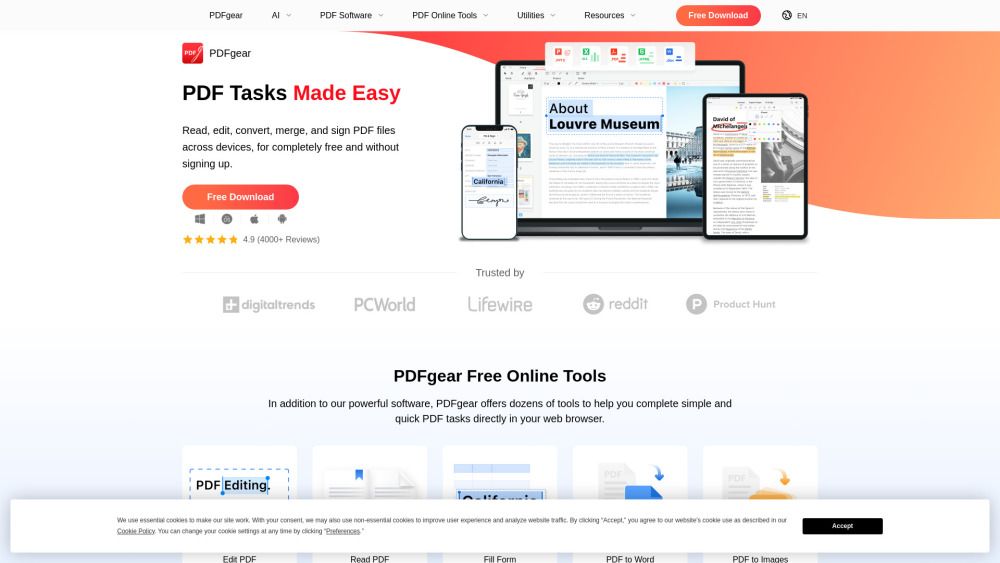
PDFgear is a world-class, AI-powered PDF editor designed to simplify the management of PDF documents for everyone, free of charge. It offers a comprehensive suite of features that allow users to edit, annotate, convert, and extract text from PDFs with ease. Whether you are working on a desktop, web, or mobile device, PDFgear ensures that you can manage your PDFs seamlessly across platforms.
Some of the standout features of PDFgear include:
Edit PDF: Freely edit text, images, shapes, signatures, links, and fillable form fields.
Annotate PDF: Highlight, underline, strikethrough text, add notes, comments, and insert shapes.
Convert PDF: Convert between various formats like Word, JPG, Excel, and more without compatibility issues.
OCR PDF: Extract text from image-based documents and convert scanned PDFs into editable formats.
PDFgear Features
PDFgear is a powerful and AI-powered PDF editor that offers a wide range of features to enhance your PDF management experience. Users can freely edit text, images, shapes, signatures, links, and fillable form fields, making PDFgear as editable as Microsoft Word. Additionally, it provides robust annotation tools, allowing users to highlight text, underline or strikethrough content, add notes, comments, stamps, and insert shapes or text boxes.
Moreover, PDFgear supports seamless conversion between various formats, including PDF, Word, TXT, JPG, Excel, and PPT, ensuring lossless conversions without compatibility issues. The software also features Optical Character Recognition (OCR) capabilities, enabling precise text extraction from image-based documents and converting scanned PDFs into fully editable formats, supporting over 30 languages. Other functionalities include online tools for editing, flattening, filling forms, merging, splitting, and compressing PDFs, making it a comprehensive solution for all PDF-related tasks.
Why PDFgear?
PDFgear offers a comprehensive suite of features that make it an invaluable tool for anyone needing to manage PDF documents. With its ability to edit PDFs as easily as Microsoft Word, users can freely modify text, images, shapes, and more. Additionally, PDFgear supports robust annotation tools, allowing users to highlight, underline, and comment on documents effectively. The software also excels in converting PDFs to and from various formats, ensuring compatibility without loss of quality.
One of the standout advantages of PDFgear is its integration of AI technology, which enhances user efficiency by simplifying complex tasks. This free and powerful tool is designed to empower users to handle their PDF needs without any cost, making it accessible to everyone. The following benefits highlight why users should consider PDFgear:
Comprehensive editing capabilities for text, images, and forms.
Advanced annotation tools for effective document collaboration.
Seamless conversion between multiple file formats.
AI-powered features for improved productivity and document management.
Completely free to use, with no hidden costs or subscriptions.
How to Use PDFgear
Getting started with PDFgear is simple and user-friendly, allowing you to manage your PDF documents efficiently. Whether you are using it on a PC, Mac, or mobile device, PDFgear provides a seamless experience across platforms. You can easily switch between desktop and mobile to continue working on your PDFs wherever you are.
To help you get started, PDFgear offers a variety of free online tools that simplify common PDF tasks. Here are some of the key features you can explore:
Edit PDF
Flatten PDF
Fill Form
PDF to Word
PDF to Images
Add PDF Pages
Delete PDF Pages
Split PDF
Merge PDF
Compress PDF
Ready to see what PDFgear can do for you?and experience the benefits firsthand.
How to Use
Visit the Website
Navigate to the tool's official website.
Pros & Cons
What's good
What's not good
Pricing
- Edit PDF
- Annotate PDF
- Convert PDF
- OCR PDF
- No sign-up required
PDFgear Traffic Analysis
Alternatives to PDFgear
Studocu Global
A platform for accessing shared study materials globally.

Suno
Suno is an innovative platform that enables users to create stunning original music in seconds using artificial intelligence. With its user-friendly interface, individuals can easily craft their own masterpieces, share them with friends, and explore a diverse range of music from artists around the globe. Suno empowers creativity for everyone, from casual singers to aspiring professionals.
Jotform AI Agents
Jotform AI Agents revolutionizes customer service by enabling businesses to respond instantly to customer inquiries anytime and anywhere. With its seamless integration capabilities and user-friendly interface, it enhances operational efficiency and improves customer satisfaction. This innovative solution empowers organizations to provide timely support, ensuring they stay connected with their clients effectively.
Lovescape AI
Create Your AI Girlfriend for Chatting

Manus
Manus is a versatile AI agent designed to transform thoughts into actions, streamlining tasks in both professional and personal settings. Its primary value lies in its ability to manage various responsibilities efficiently, allowing users to relax while it handles their to-do lists. With Manus, users can experience increased productivity and peace of mind, knowing that their tasks are being completed seamlessly.
HealCycle
HealCycle is a comprehensive app designed to support individuals dealing with hormonal imbalances, mood swings, and symptoms of PMS or PMDD. It offers personalized symptom insights and science-backed resources, along with a 24/7 AI companion for emotional support, empowering users to take control of their health journey. With HealCycle, users can gain valuable knowledge and tools to enhance their well-being and manage their cycles effectively.