About ReceiptsAI
What is ReceiptsAI?
ReceiptsAI is a powerful tool designed to automate bookkeeping for small businesses while prioritizing user privacy. It provides a ready-made structure that allows users to customize templates to fit their specific needs without being locked into a single way of working. The platform focuses exclusively on processing bookkeeping documents such as receipts, invoices, and purchase confirmations, ensuring that personal emails are ignored and not stored.
With a commitment to data privacy, ReceiptsAI allows users to define sensitive words or numbers, such as names and birthdays, which are redacted before any AI processing occurs. This privacy-first approach is complemented by features that enhance usability and efficiency, including:
Multi-currency support for automatic detection and conversion of international purchases.
Bulk document upload to process multiple files simultaneously.
Smart search capabilities to find receipts, merchants, or amounts instantly.
Automatic receipt organization by date, vendor, category, and amount.
Export options in Excel, CSV, and PDF formats for easy sharing with accountants.
Secure cloud storage with encryption for all files, ensuring they are always accessible.
Auto-categorization of expenses sorted by category upon upload.
ReceiptsAI Features
ReceiptsAI offers a range of features designed to streamline the bookkeeping process for small businesses. With automatic receipt organizing, receipts are categorized by date, vendor, category, and amount, making it easy to track expenses. The platform also supports multi-currency transactions, automatically detecting and converting international purchases. Users can upload multiple documents at once, allowing the AI to process them in parallel, and can utilize smart search capabilities to find any receipt, merchant, or amount instantly.
Additional functionalities include the ability to export data in clean, formatted Excel, CSV, and PDF files, ensuring that users have ready access to their financial information for accounting purposes. ReceiptsAI prioritizes user privacy by redacting sensitive information before processing and offers secure cloud storage with encryption for all files. This privacy-first approach ensures that users maintain control over their data while benefiting from automated bookkeeping.
Automatic receipt organizing by date, vendor, category, and amount
Multi-currency support with automatic detection and conversion
Bulk document upload for parallel processing
Smart search for quick access to receipts and expenses
Export options in Excel, CSV, and PDF formats
Secure cloud storage with encryption
Privacy controls for sensitive information redaction
Why ReceiptsAI?
ReceiptsAI offers significant advantages for small businesses looking to streamline their bookkeeping processes. By automating the handling of receipts, invoices, and other expense documents, it saves users valuable time and reduces the hassle of manual entry. The platform is designed with a privacy-first approach, ensuring that sensitive information is protected through built-in redaction features. This commitment to data privacy means that users can trust ReceiptsAI to handle their financial documents without compromising their personal information.
Some key benefits of using ReceiptsAI include:
Automated categorization of expenses, making tracking effortless.
Privacy controls that allow users to define sensitive information for redaction.
A user-friendly interface that simplifies the process of managing receipts.
Responsive customer support to assist with any inquiries or feature requests.
How to Use ReceiptsAI
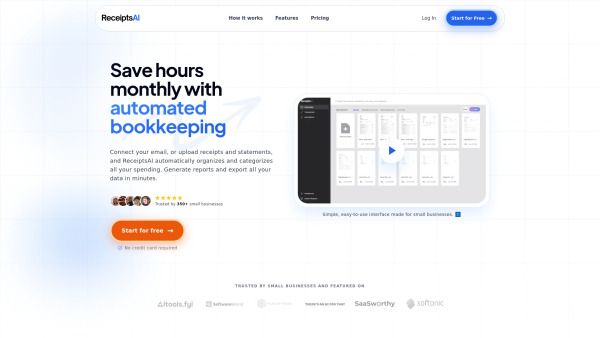
Getting started with ReceiptsAI is simple and user-friendly, designed specifically for small businesses. To begin, you can connect your email or upload receipts and statements directly to the platform. ReceiptsAI will automatically organize and categorize all your spending, saving you hours of manual bookkeeping each month. You can also generate reports and export your data in just minutes, making financial management more efficient.
Here are some key features to help you get started:
Automated organization of receipts and expenses
Easy document upload and email connection
Quick report generation and data export
Privacy controls to redact sensitive information
Ready to see what ReceiptsAI can do for you?and experience the benefits firsthand.
Key Features
How to Use
Visit the Website
Navigate to the tool's official website.
Pros & Cons
What's good
What's not good
Pricing
- 30 free credits
- Data extraction from images or PDFs
- Basic categorization
- Email support
- 100% Money Back Guarantee
- Process 100 pages per month
- Up to 30 Custom Categories
- Up to 20 Custom Rules
- Custom Document Renaming
- Auto Duplicate Detection
- Process 500 pages per month
- Up to 100 Custom Categories
- Up to 100 Custom Rules
- Custom Document Renaming
- Auto Duplicate Detection